AI Design Operations & System Integration
Scaling team velocity and engineering handoff through structured AI workflows, weekly knowledge loops, and model-context protocols.
The Strategy
Guardrails Over Unchecked Automation
Integrating generative artificial intelligence into an enterprise design process isn't about letting a team prompt haphazardly. Without structural intent, AI generation quickly introduces visual drift, fractures consistency, and breaks core design system guidelines.
My approach to AI Ops treats models as heavily conditioned copilots. By embedding AI into targeted steps of our operational lifecycle, we scale output velocity and technical literacy across the product squad—all while keeping our legacy and modern design system primitives completely stable at scale.
Process & flow map — three design tracks
Market & User Research
Discover user needs and market gaps to define the product vision.
Concept Ideation
Sketch concepts, build mood boards, and select the strongest direction.
Prototyping
Build functional models and mocks to validate the design direction.
Design Refinement
Finalize specifications, surfaces, and style guides.
Performance Review & Feedback
Collect user metrics and market data to surface design issues.
Problem Identification & Ideation
Pin down pain points and brainstorm targeted solutions.
Prototyping & Validation
Rapidly test reworked design mocks to confirm they solve the issue.
Updated Design Implementation
Integrate the best solution, update production files, and document the change.
Problem Discovery & Research
Analyzes support tickets and runs sentiment analysis to uncover actionable user insights and surface hidden pain points.
Ideation & Strategy Definition
Auto-generates design briefs, manages skill files, and explores multiple strategic pathways simultaneously.
Simulation & Virtual Testing
Leverages simulated environments and virtual user testing to predict behavior and validate usability flows before coding begins.
Implementation & Automated Iteration
Bridges design and development via Figma MCP and Code Connect to automate iterations and ensure seamless engineering handoff.
Pillar 1
Data-Driven Product Iteration
User and performance data inform every design decision — no guesswork, no assumption-driven pivots.
Pillar 2
Continuous Feedback Loops
Direct channels for constant user feedback keep the product in continuous refinement.
Pillar 3
Cross-Functional Rework Alignment
Rework decisions stay aligned across design, marketing, and production teams at every step.
The Process
Conditioning AI for Features and Maintenance
AI integration is only valuable if it respects the structural realities of production code. To prevent platform fragmentation, I lead the initiative to redefine the design process depending on the scope of work.
For New Feature Work, AI functions as a discovery and ideation accelerator. The team leverages it to support initial competitive benchmarking, data-structure investigations, and rapid layout variation options. Conversely, for Bug Fixes and Small Enhancements, the workflow switches to a tight optimization loop. Here, we utilize AI to instantly isolate legacy component parameters, analyze existing system constraints, and ensure that rapid patches never degrade our core usability or accessibility baselines.
The Culture
Distributed Team Investigations
True operational maturity requires active, continuous team alignment. To scale our collective data and technical literacy, each member of the design team is tasked with running individual research investigations, covering everything from advanced prompt optimization to simple tool explorations.
We actively monitor global industry shifts through conferences and knowledge networks to bring fresh paradigms back to the company. At least once a week, we sync to share what we have learned. These recurring feedback loops ensure that individual technical discoveries are quickly synthesized, vetted, and turned into actionable design system guidelines for the entire product squad.
The Integration
Figma MCP and Developer Handover Skills
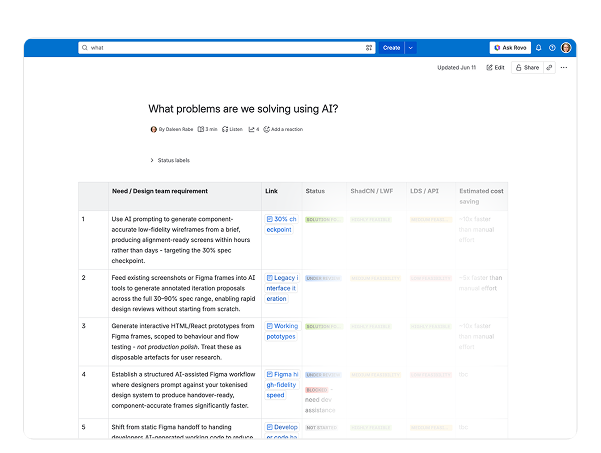
We are actively moving past superficial web interfaces by anchoring AI directly into our active design system pipelines. We leverage the Figma Model Context Protocol (MCP) to dynamically generate design screens straight from our established component library, maintaining strict visual fidelity from day one. During developer handoff, we utilize Figma Code Connect to supply engineers with live repository snippets, alongside custom-crafted AI skills shared with development squads to streamline implementation.
While we are not yet at the stage of automated code translation between our legacy React Bootstrap and utility-first Tailwind layers, this ongoing coordination is a long-term investment. I am actively collaborating with engineering leads to properly configure our GitHub repository files, giving developers faster, cleaner local build setups. It is a rigorous process to get right with deeply embedded legacy systems, but it is one I am heavily invested in to ensure long-term success.